How to Get Residents to Actually Use Your HOA App

A download is not adoption.

This guide shows how to get residents to actually use your HOA app, not just install it.

Phones are not the problem. 91% of U.S. adults own a smartphone. The gap is habit, trust, and a reason to log in.

Accounts created is the number vendors show you. Residents who literally opened the app this month is the number that matters.

Boards carry the load. About 2.6 million volunteers serve on association boards and committees, and 30–40% of associations run without a professional manager. A rollout that stalls costs volunteers hours they do not have.

Here is what follows: the obstacles to expect, a launch plan, move-in onboarding, help for residents who struggle, incentives that work, and the numbers that show whether residents are really using the app. 

If you are weighing an HOA mobile app, start with our full guide.


What are some common challenges communities face when adopting HOA apps?

Plan for six obstacles. Most are fixable before launch day.

Challenge What it looks like First fix
No clear reason to log in     Residents see the app as one more thing to check Name the two or three jobs it does best, such as paying dues, finding documents, and sending requests    
A hard first login Invites land in spam, or sign-up asks for details residents do not have     Send a short invite from a name they know, and test every step on a phone first
Low comfort with technology     Residents skip the app and call a board member Offer hands-on help, and keep a non-digital path open
Privacy worries Residents hesitate to share a phone number or email Say what you collect, who sees it, and what is optional. 67% of Americans say they understand little to nothing about what companies do with their data.    
Too many channels A Facebook group, an email list, and the app all carry news Pick one source of truth and point every other channel to it
A board that does not use it     Board members still email PDFs to each other Run board business through the app first

Each one comes down to communication, and communication is something a board can fix.

How to Get Residents to Use Your HOA App Before Launch Day

Most of the work happens before the app goes live. Take it in this order:

  1. Pick the first jobs: Choose two or three tasks residents will do right away, such as paying dues, finding documents, and submitting a request. Launching a few features well beats launching all of them at once. Add voting and discussions later.
  2. Go first as a board: Run agendas, minutes, and votes through the app for a few weeks. You will hit the snags before residents do.
  3. Announce on every channel: Start about four weeks out. Use email, a mailed or hand-delivered flyer, your newsfeed, and the next meeting. Say what residents can do, what it saves them, and the exact launch date.
  4. Name a champion or two: Ask a neighbor who is comfortable with technology to help others sign in. A neighbor at the door beats a notice in the inbox.
  5. Hold a kickoff session: Run a 30-minute drop-in at the clubhouse or on video. Tell people to bring their phones, and help each one sign in on the spot.
  6. Send personal invites: Send them in the board’s name, with the sign-in steps, after the announcement and not before.


Give the rollout time. HOA Start’s own guidance puts a typical rollout at 30 to 60 days from setup to full community adoption, including training and data migration (see our neighborhood HOA app guide). Keep the old channels running through launch, then retire each one on a date you announce.

What onboarding strategies work best for getting new residents to download and set up the app during move-in?

What onboarding strategies work best for getting new residents to download and set up the app during move-in?

Move-in is your best opening. New owners are already collecting paperwork and looking for answers.

  • Put it in the welcome packet: Include a one-page card with the sign-in address, a QR code, and a phone number for help.
  • Collect contact details once, with consent: Ask for an email address and mobile number on the new-owner form, and add a checkbox for electronic notices. In Florida, for example, an association can send official notices electronically only to members who consent in writing (Fla. Stat. 720.303(2)(c)). Other states differ, so check yours.
  • Send the invitation in the first days: On HOA Start, residents receive an invitation and create an account using their property address, so each account ties back to a home. In the app, residents need a website membership first, then sign in with the same email and password.
  • Give them one first task: Point new owners to something they will use right away, such as checking their balance or finding the architectural request form.
  • Ask your closing contacts to pass it along: Request that your management contact, title company, or closing agent include the app card with the HOA information that comes with a purchase.

How can I encourage more residents to engage with our neighborhood’s HOA website?

Residents return to places that hold answers. Give them one.

On HOA Start, the mobile app shares content with your community website, so website engagement and app adoption are the same job. These habits drive both:

  • Post it once, and point to it everywhere: Put minutes, forms, calendars, and rules on the site. In every email, text, and flyer, link to that page instead of attaching a copy.
  • Answer with the link: When someone emails a question the site already answers, reply with the page. Do this for a month, and the habit starts.
  • Update on a schedule: Post a newsfeed update on the same day each week. A stale site teaches residents not to look.


  • Keep conversations in one place: HOA Start’s communication tools include email, text alerts, private chat, newsfeeds, and message boards, so residents have less reason to start a separate group chat.
  • Say what is official: Tell residents the site is where official news lives. Your governing documents and state law still decide how formal notices go out.
  • Test it on a real phone: Check links, outdated forms, and the mobile view each month.

How do you help older residents and less tech-savvy owners get started?

How do you help older residents and less tech-savvy owners get started?

Do not write these residents off. Help them early, in person.

The need is real. In a 2015 Pew survey, 48% of adults 65 and older said, “When I get a new electronic device, I usually need someone else to set it up or show me how to use it,” and another 25% said it describes them somewhat well. The survey is a decade old, so treat it as a reminder and not a forecast.

  • Sit with them: Offer a hands-on session where someone helps them sign in on their own phone.
  • Show them the text-size setting: On an iPhone, open Settings, then Display & Brightness, then Text Size, or go to Accessibility, then Display & Text Size, then Larger Text (Apple Support). On Android, open Settings, search for Font size, and move the slider, up to 200% (Android Accessibility Help).
  • Ask your vendor about large text: The W3C’s accessibility standard expects text to resize to 200% without losing content or function (WCAG 1.4.4).
  • Invite a helper: A grown child or a neighbor can help with setup.
  • Keep a non-digital path: Mail the essentials and publish a phone number. Never make the app the only way to get important information.
What incentives or gamification features can be built into an HOA app to encourage habitual daily or weekly use?

What incentives or gamification features can be built into an HOA app to encourage habitual daily or weekly use?

You do not need points and badges. You need a reason to come back. Four levers to try:

  • Make it the front door for routine tasks: Once residents are comfortable, take amenity reservations and maintenance requests through the app first, with a phone backup.
  • Set a weekly rhythm: Post on the same day each week. People return to what arrives on schedule.
  • Ask for input and report back: Run short polls on small decisions, such as pool hours or the holiday event, then post the results so residents see how their answers changed.
  • Reward lightly: A free prize drawing for households that sign in during launch month, a thank-you in the newsletter for block champions, or a friendly block-versus-block sign-up count all cost little. Keep entry free, never tie a prize to paying dues, and ask your attorney about your state’s rules on drawings before you announce one.

Ask your vendor what is built in. If reminders or recognition features exist, use them. If not, these four levers work with any app.

How to Get Residents to Keep Using Your HOA App After Launch

How to Get Residents to Keep Using Your HOA App After Launch

Launch day is the start of the work. Habits form in the weeks after.

  • Answer fast: Residents who message the board and wait a week go back to email. Set a response target, such as two business days, and post it.
  • Check in at 30, 60, and 90 days: At each mark, review the numbers below, ask five residents what confuses them, and fix the top issue.
  • Send alerts with care: Too many notifications train residents to ignore all of them.
  • Show what is possible: Share one new use each month.
  • Retire the old way on schedule: When your announced date arrives, stop duplicating notices in channels you said you would drop.

How can HOA boards measure and track actual app engagement rates versus just download numbers?

Download counts flatter you. Track what residents do.

Metric How to calculate it What it tells you
Activation rate Homes with at least one active account ÷ total homes Whether invitations are working
30-day active rate    Homes with a login in the last 30 days ÷ total homes Whether use is a habit or a one-time visit
Reach Homes you can contact by app, email, or text ÷ total homes Whether an announcement arrives
Task share Payments, requests, and reservations made in the app ÷ all of them     Whether the app replaced the old way
Response time Median days from a resident’s message to a board reply Whether residents get a reason to return
Paper dependency     Homes still receiving mailed notices How much of the old process remains


Count homes, not individual logins, because several people can share one household. Take a baseline at day 30, then check monthly. Compare your community with itself, not with a vendor’s average.

Ask your vendor which of these it can report. If it cannot report logins by home, a simple spreadsheet and a yearly three-question survey will fill the gap: Can you sign in without help? What do you use the app for? What would you change?

Get Residents Using Your App With HOA Start

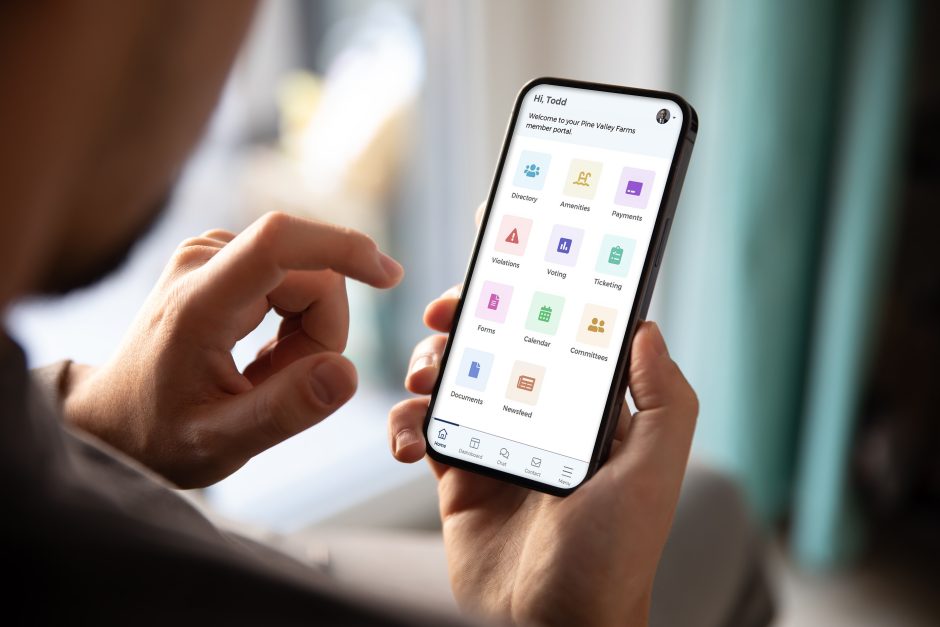
HOA Start’s mobile app puts payments, documents, requests, voting, and the newsfeed on every resident’s phone. Residents sign in with the same email and password they use on the community website. Features vary by plan.

Your board does not have to run the rollout alone. Standard onboarding and support are included. Guided onboarding adds help with member uploads and admin training sessions, and Concierge adds member imports and document uploads.


Ready to launch an app your residents will use? 

See how HOA Start helps boards spend less time chasing sign-ins and more time running the community. 

Frequently Asked Questions

How long does it take residents to adopt an HOA app?

  • HOA Start’s guidance is 30 to 60 days from setup to full community adoption, including training and data migration
  • Early users sign in within the first weeks, and the rest follow reminders, drop-in help, and personal invites
  • Check progress at 30, 60, and 90 days against your own baseline
  • Larger communities and communities with many older residents may need longer

What percentage of residents should use the HOA app?

  • No single target fits every community
  • Aim for every home to be reachable by at least one channel: app, email, text, or mail
  • Track the share of homes active in the last 30 days against your own baseline
  • Raise the goal only after your paper and phone backups are in place

Can an HOA require residents to use the app?

  • It depends on your governing documents and state law
  • In Florida, for example, electronic notice requires the member’s written consent (Fla. Stat. 720.303(2)(c))
  • Keep mail or email options for residents who do not consent or cannot use the app
  • Ask your attorney before making the app mandatory for anything official

What if some residents do not have a smartphone?

  • A web-based community site can also be opened from a computer or tablet
  • Offer email, mailed notices, and a phone number for questions
  • Let a family member or neighbor help them sign in
  • Hold a drop-in session where someone sets up access with them

Should the board stop mailing and emailing notices once the app launches?

  • Not at first, so run old and new channels together through launch
  • Set a retirement date for each old channel and announce it
  • Official notices still follow your governing documents and state law
  • Review the date at your 60-day check-in

What should the launch announcement say?

  • What residents can do: pay dues, find documents, and send requests
  • The launch date and the exact sign-in steps
  • Where to get help in person, and a phone number
  • That mail and email options remain available

Disclaimer: This article is for general information only and is not legal or technical advice. Electronic-notice rules, prize-drawing rules, and accessibility duties vary by state and by your governing documents. Consult a qualified attorney about your community’s obligations.

Get started today

HOA Start software and our community HOA website support provide all the tools you need to operate your association efficiently and effectively. Are you ready to take the next step? Join the network of HOA Start customers and share the success with your community. Call 863-462-7483 to speak with a team member, or click here to send us an e-mail message today.

Submit your question and learn more about how HOA Start can power up your community

Want more content like this, sign up to receive updates on content, webinars, events and continuing education units (CMU's).

SEE HOW WE CAN HELP

Learn More